Archive
How Aeglero handles discharge, episode history, and lookup of past patient records: purpose-built for residential treatment, not adapted from outpatient EMRs.
How the Archive Works in Aeglero
In Aeglero, every patient stay is tracked as an Episode with admit date, discharge date, bed assignment, forms, care team, and outcomes. When a patient is discharged, their status moves from active to inactive, and their episode is closed but preserved in full. The Archive page is a focused search-and-view interface for everyone who's currently inactive. It doesn't move data anywhere, it just gives you a clean place to look up past patients without cluttering your active patient list. Nothing is collapsed, summarized, or deleted; the full record stays intact for as long as you keep it.
The Discharge Workflow
Discharge happens from a patient's record (gated by the Manage Archive permission). Before the discharge will go through, Aeglero checks that every form your facility has marked as required-for-discharge has been completed for the current episode. If anything's missing, the action is blocked and the missing forms are listed by name so the clinician can finish them. You then choose a discharge reason (Completed Treatment, AMA, Transferred, or Other), and the system closes the episode, stamps the discharge date, releases the assigned bed to cleaning status, and flips the patient to inactive. If your facility uses a Discharge Summary form template, Aeglero automatically creates a draft for the clinician to fill out, with no manual step required.
Looking Up Archived Patients
Anyone with the View Archive permission can open the Archive page and search by partial name, patient code, or just the last 4 of an SSN, which is handy for quickly confirming identity when a former patient calls or returns. Search results show the patient's photo, name, code, discharge date, and status badge. Click into any record to see the full patient profile, complete history of episodes, all the forms that were filled out across every stay, and notes, read-only by default, with edit access controlled by your other permissions. Every view is audit-logged with the user, timestamp, IP address, and exactly what was viewed.
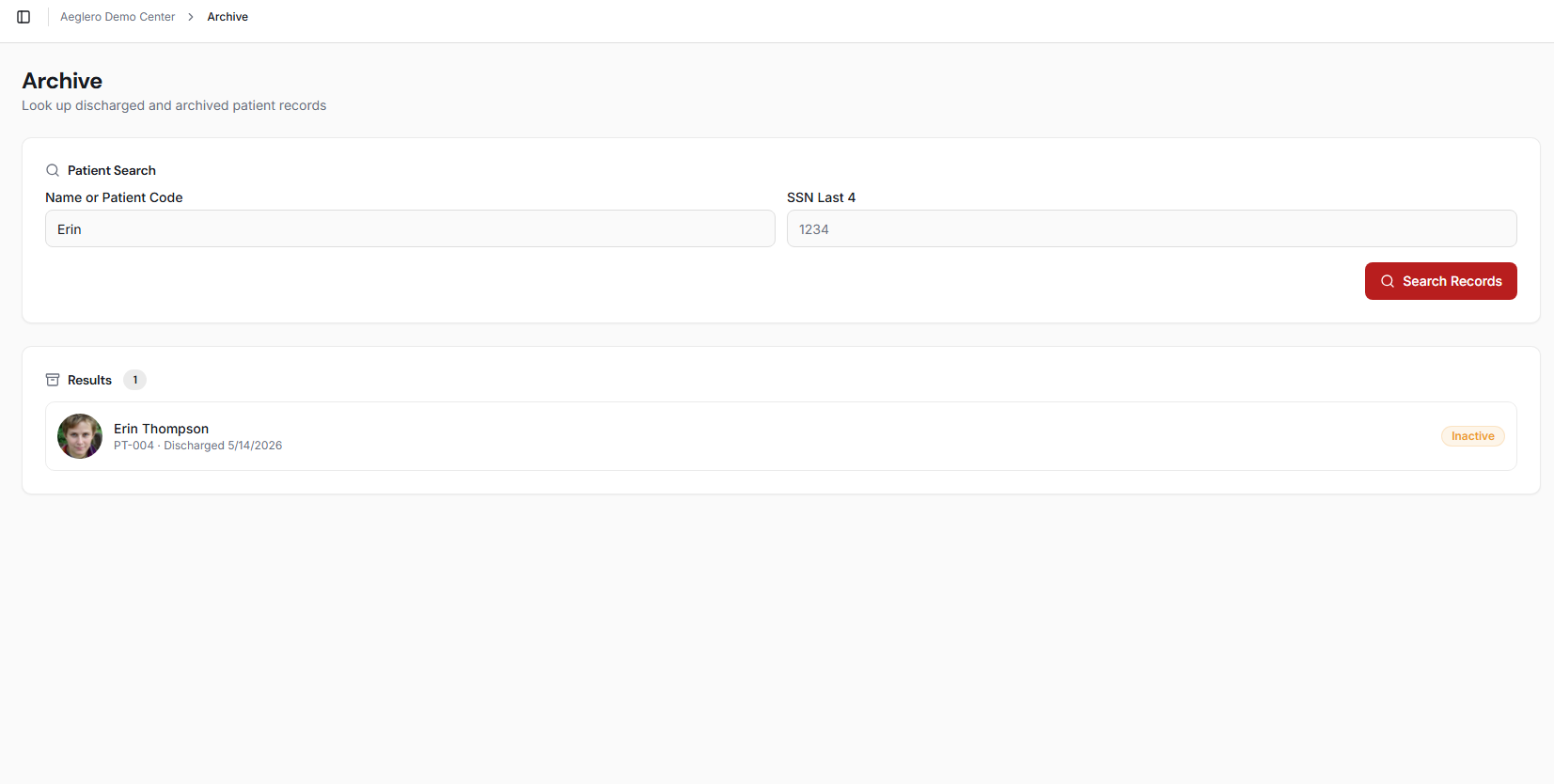
Search the Archive by partial name, patient code, or last-four SSN. Each row shows enough to confirm identity at a glance.
Readmission and Episode History
When a former patient comes back for treatment, you don't restore the old record; you readmit them, which creates a fresh Episode (Episode #2, #3, and so on) while leaving the previous episode's data completely untouched. The patient returns to pending status with a new episode ready for the admission flow, and the readmission count increments on the patient record. This means each stay is its own self-contained chart with its own admit/discharge dates, bed history, forms, and outcome, while the patient profile itself accumulates a true treatment history across time. You can review prior episodes from the patient profile to see exactly what happened on each previous admission.
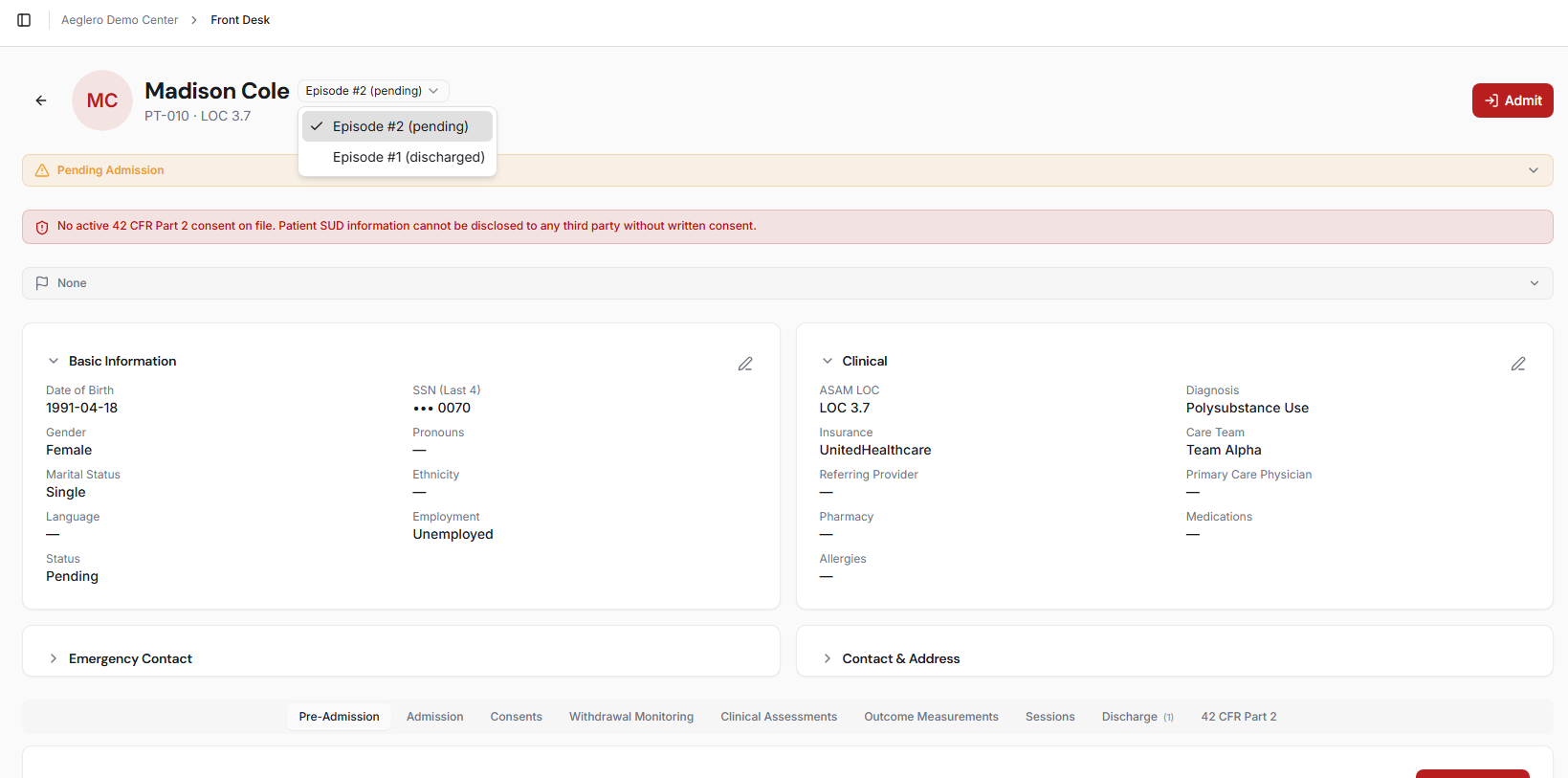
Each readmission opens a new episode. Prior episodes are preserved unchanged — admit date, discharge date, reason, forms, and bed history all intact.
Compliance and Audit Trail
HIPAA requires you to log every access to PHI, and Aeglero does this for archived records the same way it does for active ones. Every patient profile view, episode view, discharge, readmission, and form action is written to the audit log with the user who did it, their IP address, the exact resource accessed, the timestamp, and a human-readable description. The audit trail is queryable by any user with the System Logs permission, so when an auditor or accreditation surveyor asks 'who looked at this patient's record in the last six months,' you have a real answer instead of pointing at a database. Form-level access on archived patients is gated separately by the Manage Archived Forms permission, so you can decide which roles are allowed to add or edit notes on a closed chart.